
Format currency based on the sales policy configuration.
Add "vtex.format-currency": "0.x" to your dependencies.
import React from 'react'
import { FormattedCurrency } from 'vtex.format-currency'

function Foo() {
  return <FormattedCurrency value={10} />
}
// <span class="vtex-format-currency-0-x-currencyContainer">
//   <span class="vtex-format-currency-0-x-currencyCode">$</span>
//   <span class="vtex-format-currency-0-x-currencyInteger">10<span>
//   <span class="vtex-format-currency-0-x-currencyDecimal">.</span>
//   <span class="vtex-format-currency-0-x-currencyFraction">00</span>
// </span>

export default Foo
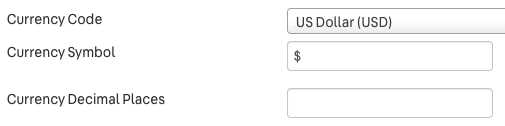
:info: Do not change the symbol or hide the decimals and fraction using CSS! You can configure the currency, currency symbol and currency decimal places in the Trade Policy settings.
formatToParts, in this browser it will fallback to render:
<span class="vtex-format-currency-0-x-currencyContainer">$ 10.00</span>import React from 'react'
import { useIntl } from 'react-intl'
import { formatCurrency } from 'vtex.format-currency'
import { useRuntime } from 'vtex.render-runtime'
function Foo({ intl }) {
const { culture } = useRuntime()
const intl = useIntl()
const value = formatCurrency({ intl, culture, value: 10 })
return <span>{value}</span>
}
// <span>
// $ 10.00
// </span>
export default Foo