



A Docker Swarm secrets plugin that integrates with multiple secret management providers including HashiCorp Vault, AWS Secrets Manager, Azure Key Vault, OpenBao, OCI Vault, Infisical, and Doppler.
swarm-external-secrets is participating in Google Summer of Code 2026 incubated under the organization OpenScienceLabs!
For more information, check out GSoC Contribution Guidelines
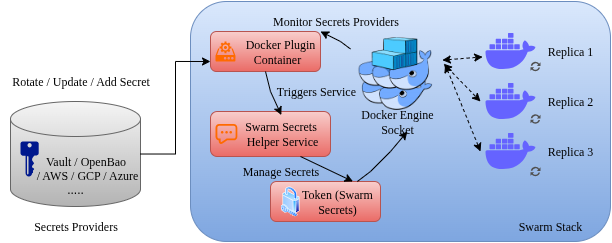
Please refer to the docs for more information. JWT login and Vault/OpenBao client-token renewal are in docs/jwt.md.
The Vault webhook guide covers listener setup, signed requests, retries, and CI smoke-test coverage. Webhook mode requires a separate event sender; the current SHA-256 validator has a known compatibility gap with HCP's SHA-512 signatures.
- Multi-Provider Support: HashiCorp Vault, AWS Secrets Manager, Azure Key Vault, OpenBao, OCI Vault, Infisical, Doppler
- Multiple Auth Methods: Support for various authentication methods per provider
- Automatic Secret Rotation: Monitor providers for changes and automatically update Docker secrets and services
- Base64 Secret Decoding (HashiCorp Vault & OpenBao): Decode base64-encoded secrets (e.g. binary JKS/PKCS12 keystores) before delivery via
base64_decode: "true"for HashiCorp Vault and OpenBao - Real-time Monitoring: Web dashboard with system metrics, health status, and performance tracking
- Flexible Path Mapping: Customize secret paths and field extraction per provider
- Production Ready: Includes proper error handling, logging, cleanup, and monitoring
- Backward Compatible: Existing Vault configurations continue to work unchanged
The plugin now supports multiple secret providers. Configure with SECRETS_PROVIDER environment variable:
# HashiCorp Vault (default)
docker plugin set swarm-external-secrets:latest SECRETS_PROVIDER="vault"

# AWS Secrets Manager
docker plugin set swarm-external-secrets:latest SECRETS_PROVIDER="aws"

# Azure Key Vault
docker plugin set swarm-external-secrets:latest SECRETS_PROVIDER="azure"

# OpenBao
docker plugin set swarm-external-secrets:latest SECRETS_PROVIDER="openbao"

# OCI Vault
docker plugin set swarm-external-secrets:latest SECRETS_PROVIDER="oci"

# Doppler
docker plugin set swarm-external-secrets:latest SECRETS_PROVIDER="doppler"

# Infisical
docker plugin set swarm-external-secrets:latest SECRETS_PROVIDER="infisical"
For multi-instance usage (for example, Vault + OpenBao with separate plugin names in Swarm), see docs/multi-provider.md.
Access the monitoring dashboard at http://localhost:8080 (configurable port):
- System Metrics: Memory usage, goroutine count, GC statistics
- Secret Rotation: Success/failure rates, error tracking
- Health Status: Overall system health and provider connectivity
- Performance Tracking: Response times, ticker health, uptime
docker plugin set swarm-external-secrets:latest \
    ENABLE_MONITORING="true" \
MONITORING_PORT="8080"-
Build and enable the plugin:
./scripts/build.sh
-
Configure the plugin:
docker plugin set swarm-external-secrets:latest \
    VAULT_ADDR="https://your-vault-server:8200" \
    VAULT_AUTH_METHOD="token" \
    VAULT_TOKEN="your-vault-token" \
    LOG_LEVEL="4" \
    ENABLE_ROTATION="true"
-
Use in docker-compose.yml:
HashiCorp Vault:
secrets:
  mysql_password:
    driver: swarm-external-secrets:latest
    labels:
      vault_path: "database/mysql"
      vault_field: "password"
AWS Secrets Manager:
secrets:
  api_key:
    driver: swarm-external-secrets:latest
    labels:
      aws_secret_name: "prod/api/key"
      aws_field: "api_key"
Azure Key Vault:
secrets:
  database_connection:
    driver: swarm-external-secrets:latest
    labels:
      azure_secret_name: "database-connection-string"
OpenBao:
secrets:
  app_secret:
    driver: swarm-external-secrets:latest
    labels:
      openbao_path: "app/config"
      openbao_field: "secret_key"
OCI Vault:
secrets:
  db_password:
    driver: swarm-external-secrets:latest
    labels:
      oci_secret_name: "my-database-password"
      oci_field: "password"
Decoding Base64 Secrets with HashiCorp Vault / OpenBao (e.g., Binary Files / Keystores):
HashiCorp Vault:
secrets:
  kafka_client_keystore:
    driver: swarm-external-secrets:latest
    labels:
      vault_path: "secrets"
      vault_field: "KAFKA_CLIENT_KEYSTORE"
      base64_decode: "true"
OpenBao:
secrets:
  kafka_client_keystore:
    driver: swarm-external-secrets:latest
    labels:
      openbao_path: "secrets"
      openbao_field: "KAFKA_CLIENT_KEYSTORE"
      base64_decode: "true"
-
Optional: enable plugin log sidecar (for
docker compose logsvisibility):On Linux, the default plugin log path is
/run/swarm-external-secrets/plugin.log. macOS and Windows filesystems do not support this/run/**path by default, so create a writable log directory on the host and pointPLUGIN_LOG_PATHat it.sudo mkdir -p /run/swarm-external-secrets sudo touch /run/swarm-external-secrets/plugin.log docker compose -f docker-compose.yml -f docker-compose.logs.yml up -d docker compose -f docker-compose.yml -f docker-compose.logs.yml logs -f secrets-logger
Example for macOS or Windows Docker Desktop:
mkdir -p ./logs
touch ./logs/plugin.log
docker plugin set swarm-external-secrets:latest \
  PLUGIN_LOG_PATH="$PWD/logs/plugin.log"
| Provider | Status | Authentication | Rotation |
|---|---|---|---|
| HashiCorp Vault | ✅ Stable | Token, AppRole, JWT | ✅ |
| AWS Secrets Manager | ✅ Stable | IAM, Access Keys, SPIFFE/OIDC | ✅ |
| Azure Key Vault | ✅ Stable | Service Principal, Access Token | ✅ |
| OpenBao | ✅ Stable | Token, AppRole, JWT | ✅ |
| OCI Vault | 🚧 Beta | API Key, Instance Principal | ✅ |
| Doppler | 🚧 Beta | Service Token, CLI Token | ✅ |
| Infisical | ✅ Stable | Universal Auth, Access Token | ✅ |
| GCP Secret Manager | 🚧 Placeholder | - | - |
docker plugin set swarm-external-secrets:latest \
    SECRETS_PROVIDER="vault" \
    VAULT_ADDR="https://vault.example.com:8200" \
VAULT_TOKEN="hvs.example-token"docker plugin set swarm-external-secrets:latest \
SECRETS_PROVIDER="aws" \
AWS_REGION="us-west-2" \
AWS_ACCESS_KEY_ID="AKIAIOSFODNN7EXAMPLE" \
AWS_SECRET_ACCESS_KEY="wJalrXUtnFEMI/K7MDENG/bPxRfiCYEXAMPLEKEY"For secretless AWS authentication with a node-level SPIRE Agent, see the SPIFFE/OIDC guide.
docker plugin set swarm-external-secrets:latest \
    SECRETS_PROVIDER="azure" \
    AZURE_VAULT_URL="https://myvault.vault.azure.net/" \
AZURE_TENANT_ID="12345678-1234-1234-1234-123456789012"# Base64-encode your PEM private key
OCI_KEY=$(base64 < ~/.oci/oci_api_key.pem | tr -d '\n')
docker plugin set swarm-external-secrets:latest \
SECRETS_PROVIDER="oci" \
OCI_AUTH_METHOD="api_key" \
OCI_REGION="us-ashburn-1" \
OCI_TENANCY_OCID="ocid1.tenancy.oc1..example" \
OCI_USER_OCID="ocid1.user.oc1..example" \
OCI_FINGERPRINT="aa:bb:cc:dd:ee:ff:00:11:22:33:44:55:66:77:88:99" \
OCI_PRIVATE_KEY="${OCI_KEY}" \
OCI_VAULT_OCID="ocid1.vault.oc1..example"Configure an installed, disabled plugin with a service token scoped to your Doppler project and config:
docker plugin set swarm-external-secrets:latest \
    SECRETS_PROVIDER="doppler" \
    DOPPLER_TOKEN="dp.st.example" \
    ENABLE_ROTATION="true" \
    ROTATION_INTERVAL="30s"
Reference a Doppler key in your stack's secrets:
secrets:
  api_key:
    driver: swarm-external-secrets:latest
    labels:
      doppler_secret_name: "API_KEY"
See the Doppler guide for a complete stack example, CLI-token settings, signed webhooks, and smoke tests that run without a Doppler account.
If you want to explore the repository or read more, check out Ask DeepWiki.