


See enemies in the dark. No alt-tab, no game files modified.
BrightRaider is a small Windows tray tool that switches brightness, contrast and digital vibrance with a single key — per game, applied the moment your game comes to the front. It works with any PC game, and does more than colours: FPS limit, G-SYNC / FreeSync setup, sound, crosshair, autorun. Game-specific tools come as modules you switch on only if you play that game — the first one is Arc Raiders (Map Scanner, Autoscrapper, QuickSelect, QuickSave).
One EXE under 6 MB, nothing to install, ready 0.2 s after you start it. Works with any keyboard — numpad, no numpad, or fully custom keys.



⬇ Download · 🌐 Website · ⭐ Get Pro — €5.49 once · 🇩🇪 Deutsch
Back to light: ready in 0.2 s, 24 MB in the tray, 14 MB on disk. A setup that walks you through, a new settings window with a guide beside every page, the G-SYNC / FreeSync setup the Blur Busters way, updates in one click, the Windows key blocked in games, your microphone on one key — and modules that download and update by themselves. Release notes · Changelog

Games & FPS — the Free killer feature. Colours and FPS limit per game, switched by themselves on Alt-Tab; the G-SYNC / FreeSync setup under Advanced.

📸 See the settings window (click to expand — 8 more screenshots)
Map Scanner — in the game. Hold M on the map: every evac timer, colour-coded, plus the map condition and an evac alarm.

Colour profiles. 9 profiles, each with Gamma / Contrast / Vibrance / Shadow Boost, its key right next to it, and dimming for your other screens.

A guide beside every page. What happens, how to set it up, what to try when something is off — here for the Map Scanner.

Audio (Pro). Mute only the game, mute teammates, Footstep Booster, output switcher — every key on the page.

Crosshair (Pro). Click-through overlay, 6 styles, colour, outline, live preview — remembered per game.

Arc Raiders module. All four tools on one page with their keys and one switch — the module downloads and updates by itself.

QuickSelect. Your game keys once in Setup, then one row per item; All columns shows the rest.

All keys. Every key in one place, with conflicts — each one is also on its feature's page.

Seen on YouTube — BrightRaider in the settings guides of JagsFPS: Arc Raiders — Best PC Settings · Arc Raiders — Best NEW PC Settings · COD MW4 & DMZ — Best PC Settings (with a BrightRaider tutorial and comparison)
▶ My own demos
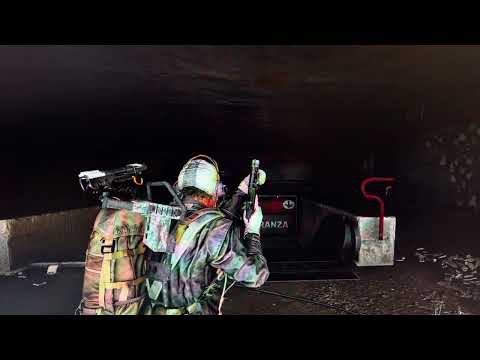
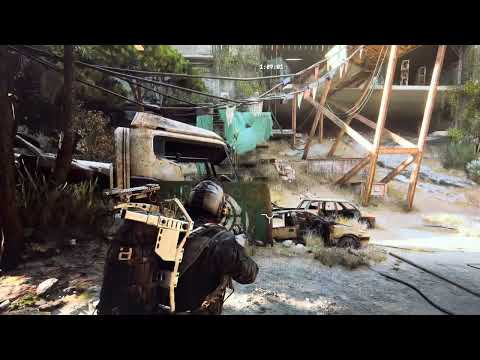
My own demos. Screen recorders can't capture the brightness — BrightRaider changes the display output, nothing inside the game — so these were filmed with a phone pointed at the monitor.
| Free — switching profiles on a key | Pro — Auto-Brightness in action |
|---|---|
 |
 |
NVIDIA's game filters are blocked in many games with anti-cheat. The monitor menu is slow and clunky. Alt-tabbing to change settings gets you killed.
BrightRaider's display and colour features work like your NVIDIA or AMD control panel and your monitor settings — through Windows and the graphics driver, nothing inside the game. The optional tools that press keys for you are a different kind; see Anti-cheat.
VibranceGUI is no longer needed. BrightRaider switches vibrance and the FPS limit per game as you alt-tab — everything VibranceGUI does, in one place.
- Brightness on a key — Normal / Bright / Brighter, instant, even in fullscreen.
- Every game its own — Gamma / Contrast / Vibrance / Hue and FPS limit per game, on while the game is in front; colours go back on Alt-Tab, the FPS limit when the game closes.
- G-SYNC / FreeSync setup — V-SYNC, low latency and the right FPS limit in the driver, the Blur Busters way, with an exact undo. FPS limit on NVIDIA and AMD.
- HDR per game and on a key · dim your other screens while the game is in front.
- No Windows key in games (no Start menu, no Sticky Keys pop-up) · the mouse stays on the game's screen · your microphone on one key.
- Keys your way — every key rebindable, with Ctrl / Alt / Shift, mouse buttons and the wheel; a key bound twice is found and shown.
- A setup that walks you through, a guide beside every settings page, Ctrl+F finds any setting.
- Updates in one click from the tray, signed and checked.
- Your calibration stays safe — your own colour calibration is saved at the first start and put back on exit, even after a crash.
- NVIDIA, AMD and Intel · multi-monitor · break reminder · start with Windows.
One key unlocks everything below, in every game — and every module, Arc Raiders now and every one after it.
- Auto-Brightness — reads how bright the scene is and blends between your profiles; set up in two clicks. 📖 Guide
- Profile editor + profiles 4–9.
- Footstep Booster — turn the game up for footsteps without gunshots blowing your ears. 📖 Guide
- Mute only the game — tap to mute, hold to turn it down; optionally muted on Alt-Tab. Discord and music keep playing.
- Mute teammates — one key silences your voice chat apps (Discord, TeamSpeak, …) while you play.
- Speakers ↔ headset on one key, optionally when the game starts.
- Crosshair — click-through overlay, 6 styles, colour, outline and size, on or off per game.
- Autorun — CapsLock runs for you; sprint, hold or toggle and tap mode per game.
- Process Optimizer — high priority and physical cores only for the game in front.
Switch a module on in the setup or under Modules: it downloads by itself, updates on its own, and loads only with BrightRaider's signature. If you don't play that game, you never get it.
Arc Raiders (8 MB, Pro)
- Map Scanner — hold M on the map: evac timers, map conditions and hatch states as a colour-coded overlay, plus an evac alarm; name the exits yourself. 📖 Guide
- Autoscrapper — press F5 with the stash open: it reads the whole stash and scraps or sells by your rules — by default only after you confirm the list. 📖 Guide
- QuickSelect — one key uses an item from your quick-use wheel. 📖 Guide
- QuickSave — one key moves an item into your safe pocket and back. 📖 Guide
Show the default keys and profiles
The setup asks for your keyboard — full-size, no numpad, or French — and sets the keys to match. Every key can be changed on its feature's page or under All keys. Works with NumLock on or off. Full-size defaults:
| Key | Action | |
|---|---|---|
| Numpad 1 / 2 / 3 | Profile Normal / Bright / Brighter | Free |
| Numpad 4–9 | Profiles 4–9 | Pro |
| Numpad . | All BrightRaider keys on / off | Free |
| Numpad 0 | Mute the game (hold: turn it down) | Pro |
| Pause | Next audio output | Pro |
| Numpad + | Crosshair on / off | Pro |
| CapsLock | Autorun | Pro |
| Numpad * · M on the map | Map Scanner overlay · scan the map | Arc Raiders |
| F5 · Numpad − · Numpad / | Autoscrapper · QuickSelect on / off · QuickSave on / off | Arc Raiders |
| Profile | Gamma | Contrast | Vibrance |
|---|---|---|---|
| 1 Normal | 1.0 | 100 % | 50 % |
| 2 Bright | 1.5 | 110 % | 60 % |
| 3 Brighter | 2.0 | 110 % | 70 % |
| 4–9 | your own (Pro) |
On Free, profiles 1–3 switch as they are; for your own colours per game, use Games & FPS.
- Download
BrightRaider.exeand start it — no installation. - The setup walks you through: keyboard, brightness, your games, FPS, sound, crosshair, notifications, modules.
- Press a profile key — the brightness switches at once, even in fullscreen.
- Pro: buy a key at Lemon Squeezy (€5.49), then Settings → App & License → Activate Pro license… and paste it. No subscription; internet once for activation, offline after that.
Coming from an older version? Exit it in the tray first (right-click → Exit), then start the new BrightRaider.exe — settings, profiles, keys and your Pro key carry over. Keys from V9.x still work; enter them once. Key not arrived, or activation limit reached? See the known-issues post.
First start: Windows asks once for admin rights. BrightRaider sets one registry value that lets Windows apply the full brightness range — the same one display calibration tools use, harmless, removable any time:
HKLM\SOFTWARE\Microsoft\Windows NT\CurrentVersion\ICM → GdiIcmGammaRange = 256
It takes full effect after one Windows restart; until then BrightRaider applies the strongest part Windows accepts.
⚠️ Antivirus warning? A known false positive — BrightRaider is an unsigned single EXE with a keyboard hook for its keys (the same as Logitech G Hub, Razer Synapse or Discord push-to-talk). V1.4 was checked by Microsoft and on VirusTotal — the results: Safety.
How BrightRaider changes your display
BrightRaider changes your display output through standard Windows and driver interfaces:
- Windows GDI — gamma and contrast, on every GPU
- NVIDIA NvAPI — digital vibrance, hue and FPS limits
- AMD ADL / ADLX — saturation, hue and FPS limits
Nothing in the game is changed and nothing is loaded into the game. It's the same as changing your monitor brightness — just faster, with presets, per game.
Auto-Brightness (Pro) looks at five small zones of your screen — the centre and four corners — and moves smoothly between your profiles: darker scene, more boost. Set up in two steps: show it a dark spot and a bright one.
BrightRaider does not change game files or memory, does not inject anything into the game and reads no game data. Its keys work through Windows' standard keyboard and mouse hooks, like any hotkey tool.
What each feature does, and the risk
| Feature | What it does | Risk (my estimate) |
|---|---|---|
| Brightness, colours, FPS limit, HDR | Windows and the graphics driver, like their control panels | none known |
| Auto-Brightness | Reads a picture of your screen | none known |
| Crosshair | A click-through window on top | low — check league rules |
| Autorun | Holds W / Shift for you; tap mode presses on a fixed rhythm | low · tap mode medium |
| Module tools that press keys (QuickSelect, QuickSave, Autoscrapper) | Keys, clicks and cursor moves in the game | medium to highest — see the module |
Every tool that sends input is optional and off until you switch it on. In games with behavioural anti-cheat, use those at your own risk; no anti-cheat vendor has confirmed or ruled out anything. In Counter-Strike, leave the crosshair off, and check the rules of any league you play in. Everything in detail: Anti-cheat safety.
- 📘 Manual — every feature, English and Deutsch
- 🧩 Arc Raiders module — its tools, keys, guides and anti-cheat notes
- 🔆 Auto-Brightness Guide · 🔊 Footstep Booster Guide
- 🛡️ Anti-cheat and antivirus · 📜 Changelog
System requirements:
- Windows 10 / 11, 64-bit — one EXE, nothing to install, no runtime.
- NVIDIA or AMD for everything (vibrance, hue, FPS limit); Intel and integrated graphics get gamma and contrast.
Does it work with other games?
Yes — BrightRaider changes your display, not the game.
Will I get banned?
Brightness, colours, FPS limit and the overlays work next to the game, not in it. The module tools that press keys for you are a different kind, and each one says so on its page. Details: Anti-cheat.
Do I need Pro?
No. Free covers what most players need: profiles on a key, colours and FPS limit per game, the G-SYNC / FreeSync setup. Pro adds sound, crosshair, Auto-Brightness, Autorun and every module.
I used VibranceGUI. Do I still need it?
No. Set vibrance per game under Games & FPS; BrightRaider switches it by itself.
The crosshair or the Map Scanner doesn't show.
Set the game to borderless — Windows draws nothing over a game in exclusive fullscreen.
I play with a controller.
The display side needs no key at all: profiles, colours, FPS limit and HDR switch by themselves when the game comes to the front. The keys can't sit on a controller button directly — Windows' keyboard hooks don't see the gamepad. Let Steam Input, DS4Windows or reWASD send a keyboard key from the button instead. More in the Manual.
Show the steps
- Settings → App & License → turn off Start with Windows, then right-click the tray icon → Exit.
- Delete
BrightRaider.exe. - Delete the folders
%APPDATA%\BrightRaiderand%LOCALAPPDATA%\BrightRaider(modules live there). - Optional: remove
GdiIcmGammaRangefromHKLM\SOFTWARE\Microsoft\Windows NT\CurrentVersion\ICM.
Found a bug or have an idea? Open an issue — or Settings → App & License → Report a problem…, which puts your version, system and log together for you. Read the known issues first.
This is a solo hobby project maintained in my free time. I read everything, but response times vary — there is no support contract.
🇩🇪 Deutsche Version
Feinde im Dunkeln sehen. Kein Alt-Tab, keine Spieldateien verändert.
BrightRaider ist ein kleines Windows-Tray-Tool, das Helligkeit, Kontrast und Digital Vibrance auf eine Taste legt — pro Spiel, angewendet, sobald dein Spiel vorne ist. Es funktioniert mit jedem PC-Spiel und kann mehr als Farben: FPS-Limit, G-SYNC / FreeSync, Sound, Fadenkreuz, Autorun. Werkzeuge für ein einzelnes Spiel kommen als Module, die du nur einschaltest, wenn du das Spiel spielst — das erste ist Arc Raiders (Map Scanner, Autoscrapper, QuickSelect, QuickSave).
Eine EXE unter 6 MB, nichts zu installieren, 0,2 s nach dem Start bereit. Für jede Tastatur — mit Numpad, ohne Numpad oder ganz selbst belegt.
⬇ Download · 🌐 Website · ⭐ Pro — 5,49 € einmalig
Wieder leicht: in 0,2 s bereit, 24 MB im Tray, 14 MB auf der Platte. Ein Assistent, der durch alles führt, ein neues Einstellungsfenster mit einer Anleitung neben jeder Seite, G-SYNC / FreeSync nach Blur Busters, Updates mit einem Klick, die Windows-Taste im Spiel gesperrt, das Mikrofon auf einer Taste — und Module, die sich selbst laden und aktualisieren. Release Notes · Changelog
NVIDIAs Spielfilter sind in vielen Spielen mit Anti-Cheat gesperrt. Das Monitor-Menü ist langsam und umständlich. Wer zum Einstellen Alt-Tab drückt, stirbt.
Die Anzeige- und Farbfunktionen arbeiten wie die Systemsteuerung von NVIDIA oder AMD und dein Monitor-Menü — über Windows und den Grafiktreiber, nichts im Spiel. Die optionalen Werkzeuge, die Tasten für dich drücken, sind eine andere Sache; siehe Anti-Cheat.
VibranceGUI brauchst du nicht mehr. BrightRaider schaltet Vibrance und FPS-Limit pro Spiel beim Alt-Tab um — alles, was VibranceGUI kann, an einem Ort.
Free — für jedes Spiel
- Helligkeit auf Taste — Normal / Hell / Heller, sofort, auch im Vollbild.
- Jedes Spiel sein eigenes — Gamma / Kontrast / Vibrance / Farbton und FPS-Limit pro Spiel, aktiv, solange das Spiel vorne ist.
- G-SYNC / FreeSync nach Blur Busters, mit genauem Rückgängig · HDR pro Spiel · andere Bildschirme abdunkeln.
- Windows-Taste im Spiel gesperrt · Maus bleibt auf dem Spielbildschirm · Mikrofon auf einer Taste.
- Jede Taste frei belegbar, doppelt belegte Tasten werden gefunden · Assistent, Anleitung neben jeder Seite, Suche mit Strg+F · Updates mit einem Klick · deine Farbkalibrierung bleibt sicher.
Pro — 5,49 € einmalig, für jedes Spiel und jedes Modul
- Auto-Helligkeit, Profil-Editor und Profile 4–9.
- Footstep Booster, nur das Spiel stumm (tippen: stumm, halten: leiser), Mitspieler stumm, Lautsprecher ↔ Headset auf einer Taste.
- Fadenkreuz pro Spiel, Autorun, Prozess-Optimierer.
Module — einschalten im Assistenten oder unter Modules; sie laden sich selbst und aktualisieren sich selbst.
- Arc Raiders — Map Scanner (M auf der Karte gedrückt halten: alle Evac-Timer farbig, Kartenzustand, Evac-Alarm), Autoscrapper, QuickSelect, QuickSave.
Der Assistent fragt nach deiner Tastatur — mit Numpad, ohne Numpad oder französisch — und legt die Tasten passend an. Jede Taste lässt sich ändern. Standard mit Numpad:
| Taste | Aktion | |
|---|---|---|
| Numpad 1 / 2 / 3 | Profil Normal / Hell / Heller | Free |
| Numpad 4–9 | Profile 4–9 | Pro |
| Numpad . | Alle BrightRaider-Tasten an / aus | Free |
| Numpad 0 | Spiel stumm (halten: leiser) | Pro |
| Pause | Nächstes Audiogerät | Pro |
| Numpad + | Fadenkreuz an / aus | Pro |
| Feststelltaste | Autorun | Pro |
Die Tasten des Arc-Moduls stehen beim Modul.
- Herunterladen,
BrightRaider.exestarten — keine Installation. - Der Assistent führt durch alles: Tastatur, Helligkeit, deine Spiele, FPS, Sound, Fadenkreuz, Meldungen, Module.
- Pro: Schlüssel bei Lemon Squeezy (5,49 €) kaufen, dann Settings → App & License → Activate Pro license…. Kein Abo; Internet einmal zur Aktivierung.
Von einer älteren Version? Erst die alte im Tray beenden (Rechtsklick → Exit), dann die neue BrightRaider.exe starten — Einstellungen, Profile, Tasten und Pro-Schlüssel werden übernommen. Beim ersten Start fragt Windows einmal nach Adminrechten, für den vollen Helligkeitsbereich; ganz wirkt er nach einem Windows-Neustart. Virenscanner-Warnung? Ein bekannter Fehlalarm — geprüft von Microsoft und VirusTotal: Sicherheit.
BrightRaider verändert keine Spieldateien und keinen Spielspeicher, injiziert nichts ins Spiel und liest keine Spieldaten. Helligkeit, Farben, FPS-Limit und HDR laufen über Windows und den Grafiktreiber — kein bekanntes Risiko. Das Fadenkreuz ist ein durchklickbares Fenster obendrauf (niedrig; in Counter-Strike aus lassen, Liga-Regeln prüfen). Werkzeuge, die Tasten drücken (Autorun, QuickSelect, QuickSave, Autoscrapper), sind optional und aus, bis du sie einschaltest — bei Verhaltens-Anti-Cheat auf eigenes Risiko. Alles im Detail: Anti-Cheat-Sicherheit.
Funktioniert es mit anderen Spielen? Ja — BrightRaider ändert die Anzeige, nicht das Spiel.
Brauche ich Pro? Nein. Free deckt ab, was die meisten brauchen: Profile auf Taste, Farben und FPS-Limit pro Spiel, G-SYNC / FreeSync. Pro bringt Sound, Fadenkreuz, Auto-Helligkeit, Autorun und jedes Modul.
Fadenkreuz oder Map Scanner sind nicht zu sehen. Stell das Spiel auf randloses Fenster — über exklusivem Vollbild zeichnet Windows nichts.
Ich spiele mit Controller. Die Anzeige braucht keine Taste: Profile, Farben, FPS-Limit und HDR schalten von selbst um. Für die Tasten lass Steam Input, DS4Windows oder reWASD eine Tastaturtaste senden.
📘 Handbuch · 🛡️ Sicherheit · 🐞 Fehler melden · Bekannte Probleme
Made for gamers — born in the Arc Raiders community.