Market quotes above your Claude Code prompt. Open /pulse to manage the
watchlist of stocks, indices and crypto pairs while you work.
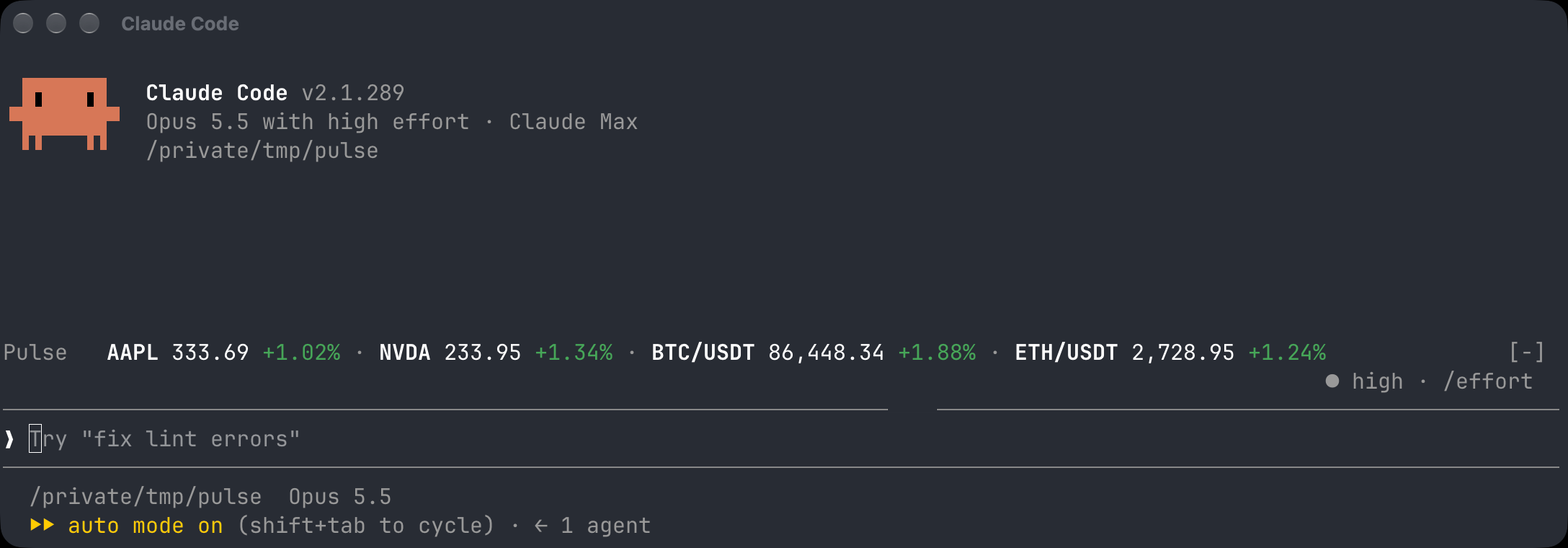
Requires Claude Code 2.1.287 or later, with Mods enabled. The ticker and
panel support the terminal and Claude Desktop's Code tab in local sessions.
Headless (claude -p / Agent SDK) sessions do not poll or draw a ticker;
Claude Desktop starts polling when its window attaches to the session.
claude plugin marketplace add fatwang2/Pulse
claude plugin install pulse-cc@pulse
Restart Claude Code or run /reload-plugins, then add tickers:
/pulse add AAPL
/pulse add NVDA
/pulse add MSFT
/pulse add BTC/USDT
/pulse
The initial watchlist is empty. Add ticker symbols, not company names.
Examples: AAPL, BRK-B, 0700.HK, 600519.SS, 7203.T, ^GSPC.
Hong Kong leading zeros are normalized; Shanghai .SH is accepted as an alias
for .SS. The quote source's coverage determines which tickers return a quote.
Unknown tickers stay visible with an error so you can correct or remove them.
Add crypto as a pair written BASE/QUOTE: BTC/USDT,
ETH/USDT, SOL/USDC. Stocks and crypto share one list and one band. A symbol
with a dash, such as BTC-USD, is read as a ticker rather than a pair.
To update an installed plugin:
claude plugin marketplace update pulse
claude plugin update pulse-cc@pulse
Restart Claude Code or run /reload-plugins to apply the update.
Pulse CC comes from the makers of Pulse for Mac: quotes in your Mac menu bar, with intraday and candlestick charts, multiple watchlists and position P&L. Free for 30 days, then a one-time purchase.

| Command | Action |
|---|---|
/pulse |
Open or close the panel |
/pulse add <ticker> |
Add a ticker |
/pulse remove <ticker> |
Remove a ticker |
/pulse refresh |
Request one refresh round, including while paused |
/pulse off |
Pause automatic refresh; keep the watchlist and cached quotes |
/pulse on |
Resume automatic refresh |
/pulse help |
Show command usage |
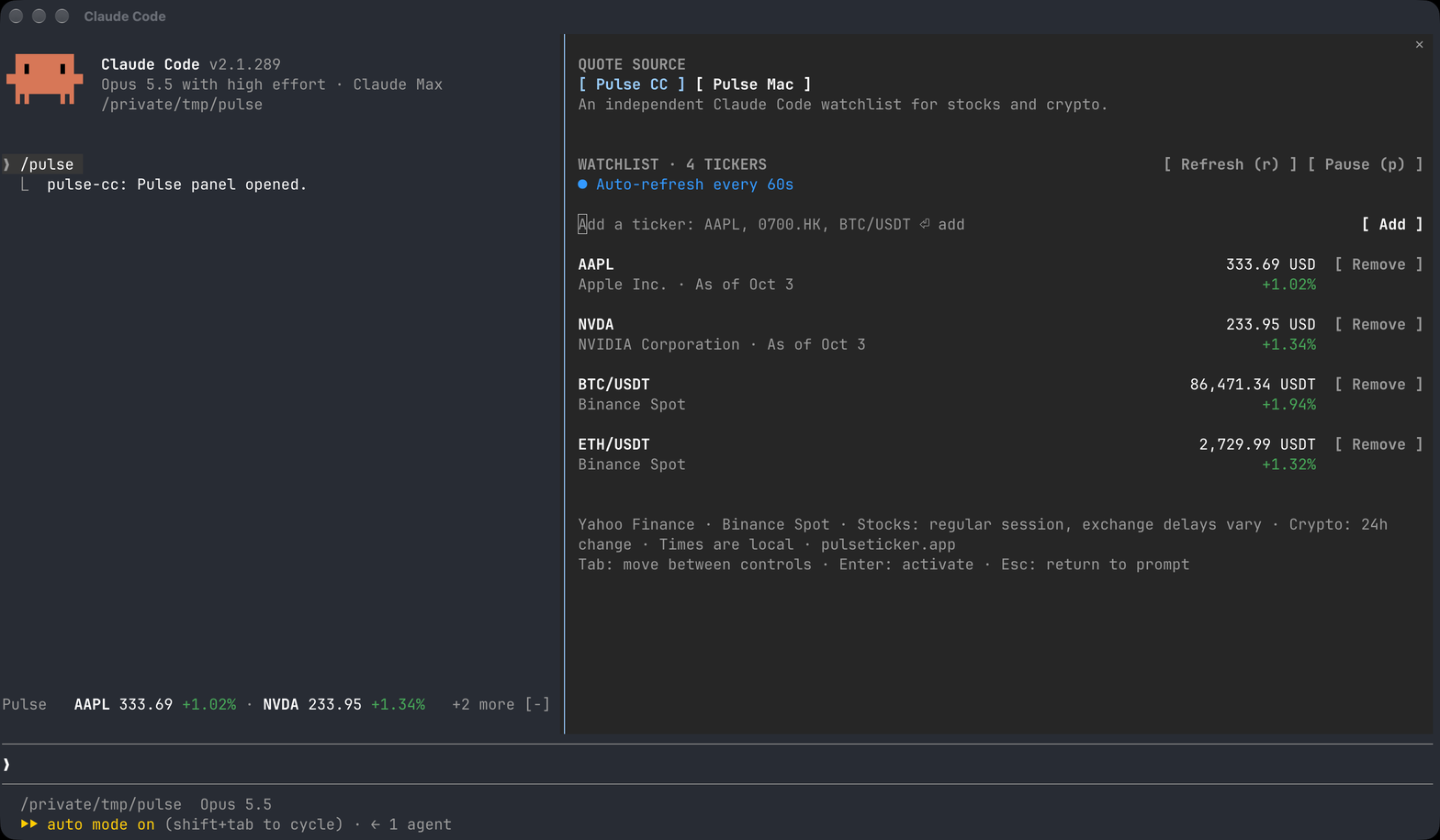
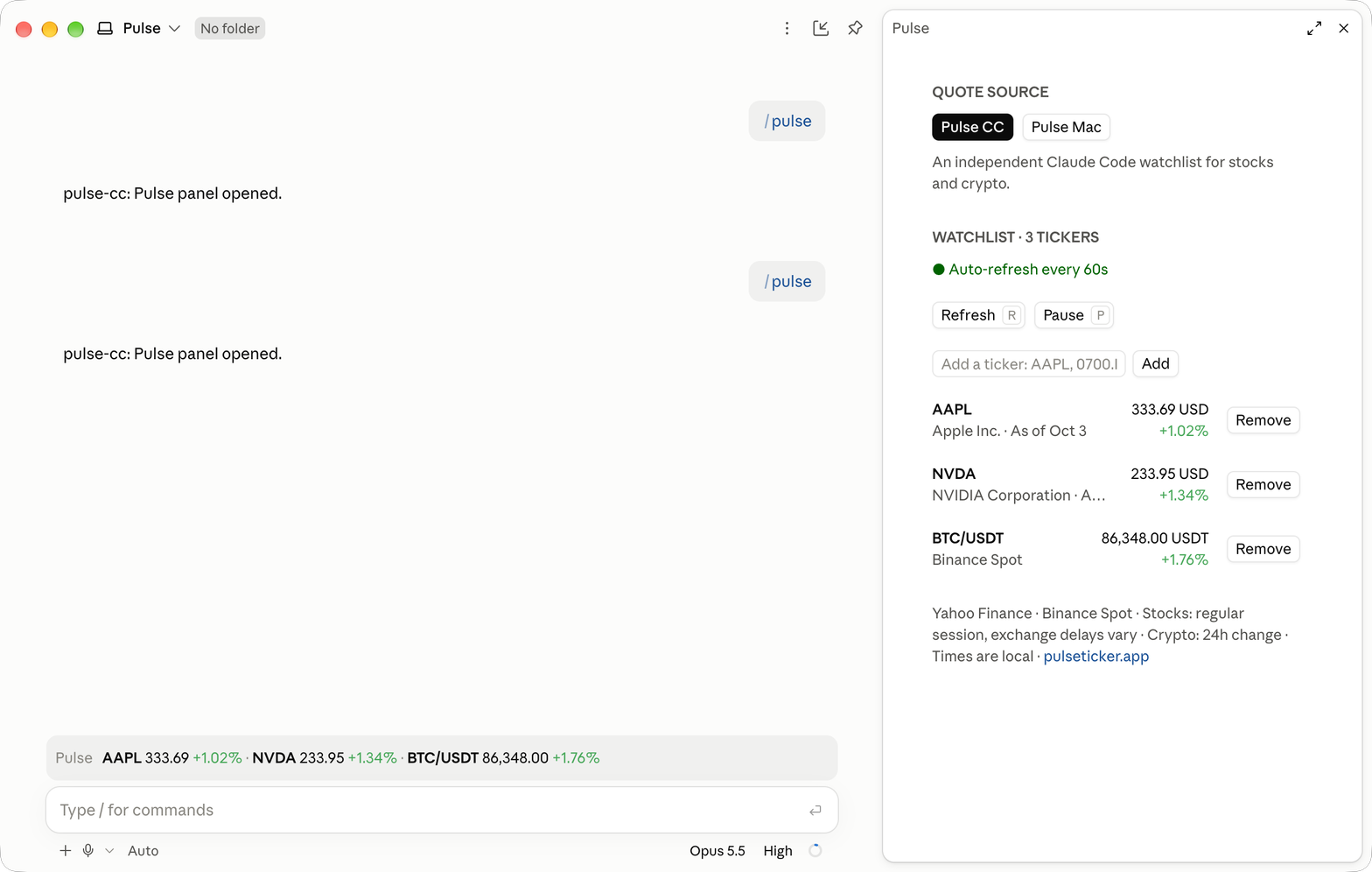
The panel header shows the watchlist size with Refresh and Pause beside it and
a colored status line below. An add field sits above the watchlist. Each row shows the
ticker and its name, the price and change on the right, and a Remove button.
Rows carry no per-row clock; a quote from an earlier day, such as the last close
over a weekend, is labelled with its date so it never reads as today's. Narrow panes stack the price below the ticker. Add with Enter or
the field's submit button. Press r or p while the panel has focus; input
fields keep ordinary typing. Press Escape to return to the prompt.
The panel uses native controls on Claude Desktop and text controls in the
terminal; both draw the same layout. The footer links to Pulse for Mac on
pulseticker.app,
and so does an empty watchlist.
In the terminal, a fullscreen session docks the panel beside the conversation:
In Claude Desktop's Code tab, the band sits above the prompt and the panel opens beside the chat with native buttons:
The band shows up to five tickers in saved order, fitting fewer in a narrow
terminal. A +N more indicator points to the rest in /pulse. Gains are green,
losses red, and percentages always include their sign. USD is omitted in this
compact band; other currencies remain visible. The panel includes currency.
Neither surface displays charts or mini trends. Opening the panel does not
trigger an extra quote request.
Pulse CC refreshes 60 seconds after each round. Stock requests are spaced at least one second apart, so a large watchlist takes longer to complete a round; crypto pairs are read together in one request.
Stock and index quotes come from Yahoo Finance.
- Prices are Yahoo's regular-session quotes, not pre-market, after-hours,
overnight quotes, or a live trade stream. The percentage compares the price
with the previous close; when that is missing, it shows
—. - A quote from an earlier day is labelled with its date. A closed market may correctly show the last trading session's price.
- Exchange delays vary. Delay is shown when Yahoo supplies it; missing delay metadata is never presented as proof of real-time data. See Yahoo's exchange data guide.
- Network or provider failures keep the last successful price and label it Cached. An unavailable ticker with no cached quote shows an error.
- HTTP 429 pauses the remaining round. Retries respect
Retry-After(at least 60 seconds) and repeated throttling backs off. Manual refresh respects this cooldown too.
Yahoo's chart endpoint is unofficial, has no availability guarantee, and may change or be unavailable in some regions. Software's MIT license does not grant rights to Yahoo's market data. These quotes are for informational use.
- Pairs are read from Binance's public Spot market-data API
(
data-api.binance.vision). No API key or account. - One request reads every pair, in batches of 100, on the same 60-second refresh as stocks. Crypto trades around the clock, so the percentage is the 24-hour change: the last price against the price 24 hours earlier.
- Binance Spot data is not delayed. The band omits the quote currency because the pair already names it; the panel shows it.
- An unknown or delisted pair shows its own error without stopping the other pairs. A Yahoo rate limit never delays crypto refreshes.
The plugin saves Yahoo ticker symbols, Binance pairs and the paused setting in
Claude Code's local plugin store (watchlist.v1). That store is shared by your
local sessions. Edits in one session are picked up by another at its next
refresh; concurrent writes across processes are last-writer-wins. Quote caches
are in memory and are fetched again in a new session.
Watching a ticker sends it to Yahoo Finance and watching a pair sends it to
Binance. The plugin has no analytics, account system, external backend,
filesystem scanner, or model calls. It does not add quotes or your watchlist to
model prompts. A command's short reply, such as Added AAPL., is visible in the
conversation. See the Pulse privacy policy.
Versions before 0.4.0 could also display Pulse Mac watchlists through a bundled
MCP connection. 0.4.0 removes that mode, the connection and its token option;
a session that had Pulse Mac selected shows your own watchlist, which was kept
separately all along. The old display setting (mac-view.v1) is left unread.
Pulse CC is a Claude Code mod: functions in hooks/register.tsx that Claude
Code calls in its own process. Everything it does goes through the mods API,
and every host call is written out in that one file.
session.start: registers the/pulsecommand and, in a terminal session, starts the quote refresh.session.attachandsession.detach(Claude Desktop only): start the refresh when a Desktop window attaches and stop it when the last one detaches.session.end: stops the refresh.command.run, matched to/pulseonly: the one call it sees is the person typing/pulse. It reads the arguments (add,remove,refresh,off,on,helpor none), updates the watchlist in the plugin store or opens and closes the panel, and answers with one short line such asAdded AAPL.. It never runs, rewrites or forwards the command, and never sees other commands.ui.renderforAbovePromptand for its ownpulse-quotespane: draws the quote band above the prompt and the/pulsepanel.
It has no hook on Claude's tool calls, prompts, permission checks or messages, so it never sees, changes or approves them.
HTTPS GET requests, at two calls, each with its https address and its options
object written at the call:
https://query1.finance.yahoo.com/v8/finance/chart/<symbol>?interval=1d&range=1d&includePrePost=falsefor each watched stock or index, at least one second apart.https://data-api.binance.vision/api/v3/ticker/24hr?symbols=<pairs>for the watched crypto pairs, up to 100 pairs per request.
They run once per refresh round, 60 seconds after the previous round ends, while the band or panel can show prices, plus rounds you request with Refresh. Responses are read only as quote data: nothing in them is run, opened or treated as a command.
- Hosts it contacts:
query1.finance.yahoo.com(Yahoo Finance) anddata-api.binance.vision(Binance). No other hosts. - What it sends: the watched symbols in the request address, a
Pulse-CC/<version>user agent andAccept: application/json. No token, cookie, account, watchlist name or other data. - The panel's Pulse for Mac links (in the footer, and under an empty watchlist)
open
https://www.pulseticker.app/in your browser only when you click them, taggedutm_source=claude-code&utm_medium=pluginandutm_content=paneloremptyso the site can count visits from the plugin. The mod sends nothing there itself, and the links carry no watchlist or other data.
Nothing. It calls no tools (no shell, agent or MCP tool), runs no commands, starts no processes and spawns no agents.
Its plugin store holds the watchlist and paused setting described above. It has no configuration options and reads no environment variables, files or credentials.
From the Pulse repository root, load a local checkout for one session:
claude --plugin-dir ./plugins/claude-codeThis works before the marketplace is published and does not install the plugin. To install from a local checkout instead:
claude plugin marketplace add .
claude plugin install pulse-cc@pulse
Keep that checkout in place for updates. GitHub installation uses the published marketplace and plugin files on the repository's default branch.
Run the native checks:
claude plugin validate plugins/claude-code
claude plugin validate .
claude plugin test plugins/claude-code
Run these commands from the repository root. Tests use Claude Code's native Mods harness: mocked host network, local store and clock, plus terminal and Desktop drawing/input checks. They make no model calls or live requests.
The plugin ID is pulse-cc; the display title and command are Pulse and /pulse.
For type checking, first load this plugin with --plugin-dir so Claude Code
generates your installed version's declarations in .claude-plugin/types/, then:
npm exec --yes --package=typescript@5.9.3 -- tsc -p plugins/claude-codeGenerated declarations stay local and are ignored by Git. All host API calls
live in hooks/register.tsx; watchlist.ts manages lifecycle, yahoo.ts
and binance.ts decode stock and crypto quotes.
The implementation was written independently;
it does not include code from meme-watch.
MIT. See LICENSE.